Best Stock Scanner Settings for Day Trading in 2026
We are reader-supported. When you buy through links on our site, we may earn a commission (see affiliate policy).
The right stock scanner settings for day trading can make a huge difference. A scanner is only useful if it shows stocks that are actually worth watching. If your filters are too broad, you get too much noise. If your filters are too strict, you may miss the best moves.
Day traders usually look for stocks with unusual volume, strong price movement, news catalysts, clean charts and enough liquidity to enter and exit quickly. The best scanner settings help you find those stocks before they become obvious to everyone else.
This guide explains the most useful stock scanner settings for day trading, including price, volume, relative volume, float, gap percentage, market cap, news, pre market movement and intraday momentum.
If you are comparing tools, see our guide to the best stock scanners, our Trade Ideas review, and our comparison of Trade Ideas vs Scanz.
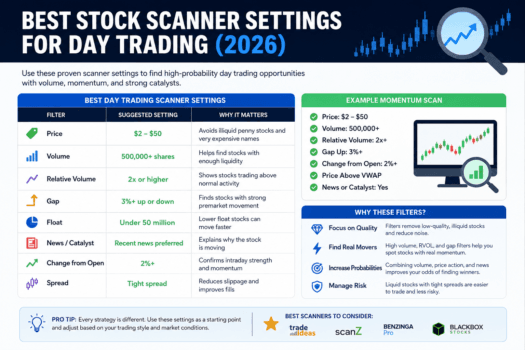
Quick Summary: Best Day Trading Scanner Settings
| Filter | Suggested Setting | Why It Matters |
|---|---|---|
| Price | $2 to $50 | Avoids illiquid penny stocks and very expensive names |
| Volume | 500,000+ shares | Helps find stocks with enough liquidity |
| Relative Volume | 2x or higher | Shows stocks trading above normal activity |
| Gap | 3%+ up or down | Finds stocks with strong premarket movement |
| Float | Under 50 million for momentum scans | Lower float stocks can move faster |
| News | Recent catalyst preferred | Explains why the stock is moving |
| Change from Open | 2%+ for momentum scans | Confirms intraday strength |
| Spread | Tight spread preferred | Reduces slippage and poor fills |
These are only starting points. The best scanner settings depend on your strategy, account size, risk tolerance and the type of stocks you trade.
What Makes a Good Day Trading Scanner?
A good day trading scanner should help you find stocks that are active right now. It should not only show stocks that look interesting after the move is over.
The best scanners for day trading usually include:
- Real-time market data
- Premarket and after-hours scanning
- Volume and relative volume filters
- Gap-up and gap-down filters
- Price change filters
- News and catalyst filters
- Custom alert windows
- Watchlist and chart integration
- Fast alerts for breakouts and unusual activity
Tools like Trade Ideas, Scanz, Benzinga Pro and Black Box Stocks are popular with active traders because they focus on real-time discovery rather than slow research.
1. Price Filter
The price filter is one of the first settings to adjust. Many day traders avoid extremely cheap penny stocks because they can have wide spreads, poor liquidity and higher risk of manipulation. At the same time, very expensive stocks may not fit smaller accounts or high-frequency trading styles.
A common starting range is:
Price: $2 to $50This range catches many active small-cap, mid-cap and momentum stocks without including the worst low-liquidity names. Some traders prefer $5 to $100 for cleaner stocks, while aggressive small-cap traders may scan from $1 to $20.
Suggested Price Settings
| Trading Style | Price Range |
|---|---|
| Small-cap momentum | $1 to $20 |
| General day trading | $2 to $50 |
| Cleaner large-cap trading | $10 to $250 |
| Beginner-friendly scans | $5 to $100 |
There is no perfect price range. The goal is to remove stocks that do not match your strategy.
2. Volume Filter
Volume is critical for day trading. A stock can look attractive on a chart, but if there is not enough volume, it may be hard to enter and exit at a fair price.
A common volume filter is:
Volume: 500,000+ sharesFor more liquid scans, use:
Volume: 1,000,000+ sharesHigher volume usually means tighter spreads, better fills and more reliable price action. However, volume alone is not enough. A stock with high volume but no trend, no catalyst and no clean setup may still be useless for day trading.
3. Relative Volume Filter
Relative volume compares today’s trading activity with the stock’s normal trading activity. This is often more useful than raw volume because it shows whether something unusual is happening.
A good starting point is:
Relative Volume: 2x or higherA stock trading at 2x normal volume is attracting more attention than usual. A stock trading at 5x or 10x normal volume may be in play because of news, earnings, social attention, unusual options activity or a major technical breakout.
For a deeper explanation, read our guide to relative volume and RVOL.
Suggested Relative Volume Settings
| Setting | Meaning |
|---|---|
| RVOL above 1.5 | Mildly above normal activity |
| RVOL above 2 | Good starting point for active scans |
| RVOL above 5 | Strong unusual activity |
| RVOL above 10 | Very unusual activity, often news-driven |
For most day trading scans, relative volume above 2 is a reasonable starting point.
4. Gap Filter
Gap filters are useful for finding stocks that moved sharply before the market opened. These stocks often attract attention during the first hour of trading.
A common gap-up scan is:
Gap Up: 3% or higherFor more aggressive momentum trading:
Gap Up: 5% or higherFor short setups or reversal scans, traders may also scan for gap-down stocks:
Gap Down: -3% or lowerA gap alone is not enough. Many stocks gap up and fade. The better setups usually combine a gap with high relative volume, a real catalyst and strong price action after the open.
5. Float Filter
Float refers to the number of shares available for public trading. Lower float stocks can move faster because there are fewer shares available to trade. This is why many momentum traders watch low-float stocks.
A common small-cap momentum filter is:
Float: under 50 million sharesMore aggressive traders may use:
Float: under 20 million sharesLow float stocks can move quickly, but they are also risky. They can have violent reversals, wide spreads and sudden halts. Beginners should be careful with very low-float stocks.
Suggested Float Settings
| Float | Typical Use |
|---|---|
| Under 20 million | Aggressive low-float momentum |
| Under 50 million | Small-cap day trading scans |
| 50 million to 500 million | More liquid mid-cap setups |
| 500 million+ | Large-cap trading and institutional names |
Float matters most for small-cap momentum traders. It matters less for large-cap traders focused on stocks like Apple, Tesla, Nvidia or major ETFs.
6. Market Cap Filter
Market cap can help separate small speculative stocks from larger established companies. Day traders use market cap filters differently depending on their strategy.
Small-cap momentum traders may scan for:
Market Cap: under $2 billionLarge-cap traders may scan for:
Market Cap: over $10 billionSmall caps usually move more aggressively, but they are riskier. Large caps usually move more cleanly, but they may require more capital or options trading to create meaningful returns.
7. News and Catalyst Filter
Many of the best day trading setups have a catalyst. A catalyst gives traders a reason why the stock is moving.
Common catalysts include:
- Earnings reports
- Guidance changes
- Analyst upgrades or downgrades
- FDA news for biotech stocks
- Mergers and acquisitions
- Major contracts
- Product launches
- Sector news
- Unusual options activity
- Social media momentum
A stock moving without a clear catalyst can still be tradeable, but the move may be harder to trust. News helps explain why volume is increasing and why other traders may be paying attention.
If news is central to your strategy, compare tools like Benzinga Pro and Scanz, which focus heavily on real-time news and alerts.
8. Intraday Momentum Filter
Intraday momentum filters help find stocks that are not only gapping, but continuing to move after the market opens.
A useful setting is:
Change from Open: +2% or higherFor stronger momentum:
Change from Open: +5% or higherThis helps avoid stocks that gapped up premarket but sold off immediately after the open. A stock that gaps up and keeps moving higher is often more interesting than one that opens strong and fades.
9. VWAP Filter
VWAP is a popular intraday reference point. Many traders use it to judge whether buyers or sellers are in control.
Useful VWAP-based scanner ideas include:
- Price above VWAP
- Price reclaiming VWAP
- Price pulling back toward VWAP
- Strong stocks holding above VWAP
- Weak stocks rejecting VWAP from below
For long setups, many traders prefer stocks holding above VWAP. For short setups, traders may look for stocks below VWAP that fail to reclaim it.
Read our full guide to VWAP for more detail.
10. Spread and Liquidity Filter
A stock can have volume and momentum but still be difficult to trade if the spread is too wide. The spread is the difference between the bid and ask price.
For day trading, tighter spreads are usually better. Wide spreads create slippage, poor fills and unnecessary risk.
A simple rule is:
Avoid stocks with spreads that are too wide relative to the stock price.For example, a $5 stock with a $0.50 spread is usually too expensive to trade efficiently. A $50 stock with a $0.03 spread is much cleaner.
Best Scanner Settings for Different Day Trading Strategies
There is no single best scanner setup for every trader. The right settings depend on the type of trade you are trying to find.
Momentum Scanner Settings
| Filter | Setting |
|---|---|
| Price | $2 to $50 |
| Volume | 500,000+ |
| Relative Volume | 2x+ |
| Gap | 3%+ |
| Change from Open | 2%+ |
| News | Preferred |
This setup is designed to find stocks that are moving with volume and attention. It is useful for gap-and-go trades, breakout trades and strong intraday momentum.
Premarket Gap Scanner Settings
| Filter | Setting |
|---|---|
| Price | $2 to $100 |
| Premarket Volume | 100,000+ |
| Gap | 3%+ |
| Relative Volume | 2x+ |
| Float | Optional, under 50 million for small caps |
| News | Strongly preferred |
Premarket scans help traders build a watchlist before the open. The key is to avoid chasing every gapper and focus on stocks with volume, news and clean levels.
Large-Cap Day Trading Scanner Settings
| Filter | Setting |
|---|---|
| Price | $20+ |
| Volume | 1 million+ |
| Relative Volume | 1.5x+ |
| Market Cap | $10 billion+ |
| News | Preferred |
| Spread | Tight |
This setup is better for traders who prefer cleaner, more liquid stocks. These stocks may move less dramatically than small caps, but they often have better spreads and more institutional volume.
Reversal Scanner Settings
| Filter | Setting |
|---|---|
| Price | $2 to $100 |
| Volume | 500,000+ |
| Relative Volume | 2x+ |
| Distance from High/Low | Near extremes |
| VWAP | Reclaim or rejection |
| News | Helpful but not always required |
Reversal scans are more advanced because they often involve trading against the immediate move. They require discipline, clear risk levels and confirmation from price action.
Example Trade Ideas Scanner Filters
If you use Trade Ideas, you can build scans around price, volume, relative volume, float, alerts and custom formulas. For example, a simple momentum scan could include:
- Price between $2 and $50
- Relative volume above 2
- Volume above 500,000
- Gap up more than 3%
- Price above VWAP
- Recent high-of-day alert
- News or unusual activity preferred
Advanced users can also use Trade Ideas custom formulas to create more specific filters, such as volume surge, strong close near high of day, intraday momentum or price above key moving averages.
If you want to test Trade Ideas, see our Trade Ideas coupon codes page before subscribing.
Common Scanner Mistakes
Stock scanners are powerful, but they can also create bad habits if used incorrectly. Many traders lose money because they chase every alert without understanding the setup.
Using Too Many Alerts
If your scanner triggers every few seconds, it is probably too broad. Too many alerts create noise and make it harder to focus on the best opportunities.
Ignoring Volume Quality
Raw volume is useful, but relative volume is often more important. A stock with 1 million shares traded may be normal for one stock and extremely unusual for another.
Chasing Extended Moves
A scanner can find stocks that are already up a lot. That does not mean you should chase them. Always check risk/reward, chart structure and where your stop would be.
Ignoring News
If a stock is moving sharply, find out why. A real catalyst can support a move. A stock moving without clear reason may reverse quickly.
Not Reviewing Results
A scanner setup should be tested and reviewed over time. Track which alerts produce good trades and which ones create noise. If you do not already track your trades, read our guide on how to journal your trades.
Best Tools for Day Trading Scans
Several platforms can be used for day trading scans, but they serve different types of traders.
| Scanner | Best For |
|---|---|
| Trade Ideas | Real-time scanning, AI tools, backtesting and active day trading |
| Scanz | Real-time scanning, Level 2 data and news |
| Benzinga Pro | News-driven trading and fast market headlines |
| Black Box Stocks | Options flow, alerts and trading community |
| Finviz | Basic screening and free stock research |
| TradingView | Charting, alerts and technical analysis |
For active day trading, free scanners are usually limited. They can help with research, but real-time alerts, premarket scanning and fast filtering usually require a paid tool.
FAQ
What are the best stock scanner settings for day trading?
A good starting setup is price between $2 and $50, volume above 500,000 shares, relative volume above 2, gap above 3%, tight spread and a recent catalyst. These settings can be adjusted depending on your strategy.
What relative volume should I use for day trading?
Many traders use relative volume above 2 as a starting point. More aggressive scans may use 5x or higher to find stocks with extreme unusual activity.
What price range is best for day trading scans?
A common range is $2 to $50. Beginners may prefer $5 to $100 to avoid very low-priced, volatile and illiquid stocks.
Should I scan premarket?
Yes, premarket scanning can help you build a watchlist before the open. Look for stocks with meaningful premarket volume, a clear gap and a real news catalyst.
Is a free stock scanner enough for day trading?
A free stock scanner can be useful for research, but serious day traders usually need real-time data, alerts, premarket scanning and better filters. Paid scanners are usually stronger for active intraday trading.
Final Thoughts
The best stock scanner settings for day trading depend on your strategy, but most good scans focus on the same core factors: price, volume, relative volume, gap percentage, liquidity, news and intraday momentum.
A simple scan using price from $2 to $50, volume above 500,000, relative volume above 2 and a gap above 3% can be a useful starting point. From there, you can refine the scan based on your preferred setups.
The goal is not to find every moving stock. The goal is to find clean, liquid, active stocks that match your trading plan. A scanner should help you reduce noise, not create more of it.
For active traders who want advanced scans, AI tools and backtesting, read our full Trade Ideas review. For broader comparisons, see our guide to the best stock scanners.