Trade Ideas Brokerage Plus Review
We are reader-supported. When you buy through links on our site, we may earn a commission (see affiliate policy).
Brokerage Plus is the trading and automation module inside Trade Ideas. It acts as the control center for orders, positions, simulator trading, broker connections and strategy automation.
Trade Ideas is best known as a real-time stock scanner, but Brokerage Plus is what turns the platform into something closer to a complete trading workstation. Instead of only finding trade ideas, traders can use Brokerage Plus to paper trade, place orders, manage positions and automate strategies based on scans or custom formulas.
Brokerage Plus is most useful for active traders who already understand Trade Ideas scanners and want to test or execute strategies more systematically. It is not something beginners should rush into with live money.
In this review, we’ll explain what Trade Ideas Brokerage Plus does, how it works, which brokers it supports, who should use it and what risks traders should understand before connecting a live account.
Trade-Ideas.com
What Is Trade Ideas Brokerage Plus?
Brokerage Plus is the Trade Ideas portfolio manager and order management module. Trade Ideas describes it as the control center for orders and positions. It can connect to supported brokers, display current positions, place trades and automate strategies directly from Trade Ideas. Trade Ideas’ user guide describes Brokerage Plus as the control center for orders and positions.
The module can be used in two main ways:
- Simulation mode: trade in Trade Ideas’ real-time simulator without risking real money.
- Broker-connected mode: connect a supported brokerage account and manage trades through Trade Ideas.
For most traders, simulation mode is the best place to start. Brokerage Plus can be powerful, but live trading automation adds risk. You should understand the order logic, position sizing and exit rules before connecting a live broker account.
What Can Brokerage Plus Do?
Brokerage Plus lets traders do more than scan the market. It helps bridge the gap between finding an opportunity and managing a trade.
According to Trade Ideas, Brokerage Plus can be used for one-click orders from scans and charts, complex strategies based on scans, strategies based on custom formulas and automation of personal trading strategies. Trade Ideas lists one-click orders, custom formula strategies and strategy automation as Brokerage Plus features.
The main Brokerage Plus features include:
- Real-time simulator trading
- Broker account connection
- Order entry from charts
- Order entry from scanners
- One-click order buttons
- Position management
- Strategy automation
- Automation based on Trade Ideas scans
- Automation based on custom formulas
- Live or paper trading depending on broker support
This makes Brokerage Plus one of the more advanced parts of Trade Ideas. It is especially relevant if you are interested in automated or semi-automated trading.
Supported Brokers
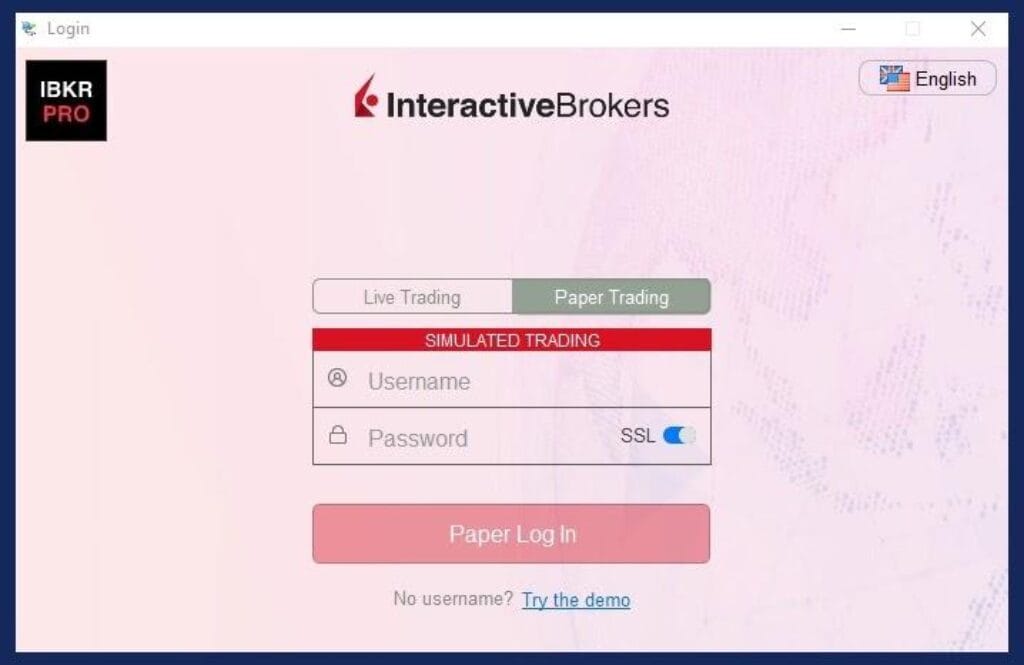
Trade Ideas says Brokerage Plus supports its in-house simulator, Interactive Brokers live or paper trading, Alpaca live or paper trading, TradeStation live or paper trading and E*TRADE live accounts. Supported integrations can change, so always verify current broker support on Trade Ideas before relying on a specific connection. Trade Ideas lists supported Brokerage Plus trading connections in its user guide.
Trade Ideas also lists partners and integrations such as TradeStation, Alpaca, Interactive Brokers, CenterPoint Securities and Cobra Trading on its partners page. Trade Ideas’ partners page lists broker and integration relationships.
Do not assume every broker supports every feature. Live trading, paper trading, options, routing, data and automation capabilities can vary by broker and account setup.
Brokerage Plus Simulation Mode
Simulation mode is one of the most useful parts of Brokerage Plus. It allows traders to test strategies in real-time market conditions without risking capital.
Trade Ideas says Brokerage Plus includes a real-time simulator where experienced traders can test strategies and newer traders can learn in real market conditions before going live. Trade Ideas describes the Brokerage Plus simulator as a way to test strategies before going live.
This is important because scanner alerts can look attractive until you test how they actually perform. Simulation mode lets you see whether your entries, exits, position sizing and risk rules make sense in real time.
Before connecting a live broker, you should use simulation mode to answer questions like:
- Does the strategy trigger too often?
- Are entries too early or too late?
- Does the scan produce too many weak setups?
- Are stop-losses placed logically?
- Does the strategy perform differently in choppy markets?
- How much slippage might matter?
- Can you follow the strategy without emotional interference?
One-Click Order Entry
Brokerage Plus allows one-click order entry from Trade Ideas charts and scanners. This can be useful for active traders who want faster execution after an alert appears.
The advantage is speed. If a stock triggers your scan and you decide the setup is valid, you can act without manually typing every order into a separate brokerage platform.
The risk is also speed. One-click trading can make mistakes happen faster. Wrong size, wrong ticker, wrong direction or wrong order type can become expensive quickly. Traders should configure order defaults carefully and test in simulation before using live order buttons.
Strategy Automation
Strategy automation is where Brokerage Plus becomes more powerful and more dangerous. Trade Ideas allows traders to automate strategies based on scans and custom formulas.
This means a trader can build a scan, define trading rules and use Brokerage Plus to help execute trades when the conditions are met. This can reduce hesitation and make execution more consistent.
However, automation does not make a bad strategy good. It only executes rules faster. If your scan creates poor signals, automation may simply lose money faster than manual trading.
If you want to build better scanner logic, read our Trade Ideas custom formula examples and our guide to the best Trade Ideas scans for day trading.
Brokerage Plus and Money Machine
Brokerage Plus is closely related to Trade Ideas’ broader automation workflow. Newer features such as Money Machine build on the idea of connecting scans, AI strategies, simulation and execution.
Money Machine is more focused on AI-powered automation and momentum trading workflows. Brokerage Plus is the order, position and broker connection module that makes automation possible inside the Trade Ideas ecosystem.
In simple terms, Trade Ideas scans and AI tools find opportunities. Brokerage Plus helps test, execute and manage trades. Money Machine pushes further into automated AI strategy workflows.
Brokerage Plus and Holly AI
Holly AI generates AI-assisted trade ideas inside Trade Ideas. Brokerage Plus can be part of the execution and management side of that workflow.
Traders should be careful here. AI-generated ideas can still lose money. If you connect AI signals with automation, you need strict risk controls and strong supervision.
Holly AI can help identify ideas. Brokerage Plus can help execute or simulate trades. The trader is still responsible for deciding whether the setup, size and risk make sense.
Brokerage Plus Preferences and Quick Buttons
Brokerage Plus includes settings for order defaults and custom quick buttons. Trade Ideas says the preferences menu allows users to set default manual order entry settings and custom quick buttons, including hotkey-style shortcuts. Trade Ideas’ Brokerage Plus preferences guide explains order defaults and quick buttons.
This is useful for speed, but it must be configured carefully. If your default order size or order type is wrong, quick buttons can create avoidable mistakes.
Before using quick buttons live, test them in simulation and make sure every button does exactly what you expect.
How to Connect Brokerage Plus
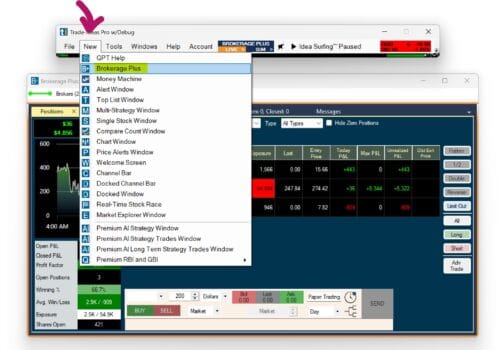
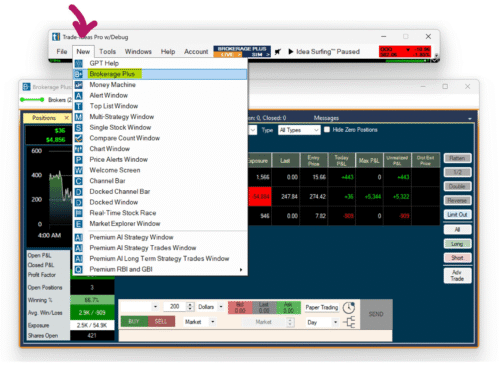
Brokerage Plus can be opened from the Trade Ideas toolbar. Trade Ideas says users can open Brokerage Plus from the New Tab menu or by clicking Brokerage Plus Live or Brokerage Plus Sim in the toolbar. Selecting Brokerage Plus Sim connects automatically to the Trade Ideas simulator. Connecting a live broker requires extra setup. Trade Ideas explains how to open Brokerage Plus and connect to simulation or broker accounts.
Broker setup varies by broker. For example, Interactive Brokers requires proper API settings in Trader Workstation, and Trade Ideas’ connection guide notes that paper and live port settings must match between Interactive Brokers and Trade Ideas. Trade Ideas provides broker-specific connection instructions for Brokerage Plus.
Before connecting, check:
- Your broker is currently supported
- Your broker platform is open if required
- API settings are configured correctly
- Live and paper account settings match
- You understand order routing and data requirements
- You have tested the connection in paper mode first
Who Should Use Brokerage Plus?
Brokerage Plus is best for traders who are already comfortable with Trade Ideas scanners and want to trade more systematically. It is especially useful for paper trading, testing scanner ideas, managing positions and experimenting with automation.
Best For
- Active day traders
- Trade Ideas users who want paper trading
- Traders testing scanner-based strategies
- Users interested in one-click order entry
- Traders using supported broker integrations
- Users exploring automation carefully
- Traders who already understand risk management
Not Best For
- Complete beginners
- Passive investors
- Users who only need basic screening
- Traders who do not use stop losses
- Anyone expecting automation to guarantee profits
- Users who are not willing to test in simulation first
- Traders who do not understand order types and position sizing
Brokerage Plus Pros and Cons
Pros
- Turns Trade Ideas into a more complete trading workstation
- Real-time simulator included
- Supports one-click order entry from charts and scans
- Can connect to supported brokers
- Useful for paper trading scanner strategies
- Can automate strategies based on scans or custom formulas
- Works well with Trade Ideas’ broader scanner and AI ecosystem
- Useful for traders who want a more systematic workflow
Cons
- Not beginner-friendly
- Live automation can be risky
- Broker setup can be technical
- Supported brokers and features can vary
- One-click orders can create fast mistakes if configured poorly
- Requires strong risk management
- Simulation results may differ from live execution
- Not useful if you only need a basic stock screener
Brokerage Plus vs Manual Trading
Manual trading gives you more control over every decision. Brokerage Plus gives you more speed, structure and automation potential.
Manual trading may be better if you are still learning or if your strategy requires discretion. Brokerage Plus may be better if you have a repeatable strategy and want to test or execute it more consistently.
The wrong approach is to automate before you understand the strategy. The better approach is to trade manually or in simulation first, prove that the idea has potential, then consider automation later.
Brokerage Plus vs Trade Ideas Scanner
The Trade Ideas scanner helps you find opportunities. Brokerage Plus helps you simulate, execute and manage trades based on those opportunities.
You can use Trade Ideas without Brokerage Plus if you only want alerts and scanner ideas. But if you want to paper trade, connect a broker or automate strategies, Brokerage Plus becomes more important.
Most users should learn the scanner first. Once you understand your alert windows and setups, Brokerage Plus becomes more useful.
Is Brokerage Plus Safe?
Brokerage Plus can be safe if used carefully, especially in simulation mode. The risk comes when traders connect live brokerage accounts, use one-click orders carelessly or automate strategies without proper testing.
To reduce risk:
- Start in simulation mode.
- Use small position sizes if moving live.
- Test every order button before live use.
- Check broker connection settings carefully.
- Define stop losses and max daily loss limits.
- Do not automate strategies you have not tested.
- Monitor automation while it is running.
- Stop trading immediately if orders behave unexpectedly.
Brokerage Plus is a tool. It can improve workflow, but it can also amplify mistakes if used carelessly.
Is Trade Ideas Brokerage Plus Worth It?
Brokerage Plus is worth using if you are an active Trade Ideas user who wants to paper trade, test strategies, manage positions or explore automation. It adds a practical execution layer to Trade Ideas’ scanning and AI tools.
It is not worth focusing on if you are still learning basic stock screening. In that case, start with scanner alerts, watchlists and paper trading before getting deep into broker connections or automation.
For serious active traders, Brokerage Plus is one of the features that makes Trade Ideas more than just a stock scanner. It can help turn scan ideas into a more systematic trading process, especially when used with simulation first.
Trade-Ideas.com
Final Verdict
Trade Ideas Brokerage Plus is a powerful module for order management, simulation, broker connection and strategy automation. It is the part of Trade Ideas that helps connect scanner alerts with actual trading workflows.
The best feature is the real-time simulator. Traders can test ideas in market conditions before going live. The most dangerous feature is live automation, because poorly tested strategies can create fast losses.
Brokerage Plus is best for active traders who already understand Trade Ideas and want to trade more systematically. It is not a shortcut for beginners and it is not a guaranteed profit tool.
If you are new to Trade Ideas, start with our Trade Ideas review, then compare Trade Ideas Standard vs Premium. If you are interested in automation, also read our Trade Ideas Money Machine review.
Related articles: Trade Ideas Review, Trade Ideas Coupon Codes, Trade Ideas Holly AI Review, Trade Ideas Money Machine Review, Best Trade Ideas Scans.
Main review: Trade Ideas.