Trade Ideas Review – September 2026


We are reader-supported. When you buy through links on our site, we may earn a commission (see affiliate policy).
In a Nutshell
Trade Ideas is one of the most advanced stock scanners for active traders in 2026. Founded in 2003 and continuously updated, the platform has earned its place as the go-to tool for serious day traders — offering real-time market scanning, customizable alerts, AI-powered trade signals via Holly AI, OddsMaker backtesting and seamless broker-connected automation tools.
Unlike basic stock screeners that simply filter stocks by price, volume or technical indicators, Trade Ideas continuously monitors the market in real time and surfaces unusual activity as it happens. This makes it especially powerful for day traders, momentum traders and swing traders who need fast, actionable stock discovery — not stale data from hours ago.
The main strengths are Holly AI, real-time scanners, OddsMaker backtesting, custom formulas, Brokerage Plus, paper trading and automation tools such as Money Machine. The main drawbacks are price and complexity. The platform is not cheap and beginners may need time to learn it properly.
In this Trade Ideas review, we’ll cover the platform’s main features, pricing, AI tools, pros and cons, coupon codes, alternatives and whether it is worth it in 2026.
Table of Contents
This Trade Ideas review is designed to help active traders decide whether the platform is worth paying for, which plan makes sense and how it compares with other stock scanners.
Trade Ideas Review: Who Is Trade Ideas Best For?
Trade Ideas is built for active traders who need speed and precision. It is best suited to those who require fast stock discovery, real-time alerts, AI-assisted trade signals and data-driven strategy testing. Casual investors or buy-and-hold traders are unlikely to need everything it offers, but active traders who spend time at the screen each day will find it difficult to outgrow.
Best For
- Day traders looking for momentum stocks, breakouts, gaps and unusual volume
- Swing traders who want custom scans and watchlists
- Traders who want AI-generated long and short trade ideas from Holly AI
- Users who want to backtest strategies before using them live
- Traders who want broker integration, simulation and automation tools
- Experienced traders who want a faster market discovery workflow
Not Best For
- Complete beginners who only need a simple stock screener
- Long-term investors focused mainly on fundamentals
- Dividend investors
- Users who do not trade during market hours
- Traders who are not willing to learn a more advanced platform
- Anyone expecting AI signals to guarantee profitable trades
How We Tested Trade Ideas
For this Trade Ideas review, we evaluated the platform as an active trading scanner rather than a general investing research tool. We focused on scanner speed, alert usefulness, Holly AI, custom scan flexibility, OddsMaker backtesting, Brokerage Plus, pricing and how practical the platform is for real trading workflows.
We also compared Trade Ideas with other stock scanning and trading tools including Scanz, Benzinga Pro, Black Box Stocks, Finviz and TradingView. Our goal was to judge where Trade Ideas is genuinely strong, where it is weaker and which type of trader it suits best.
This Trade Ideas review is written for traders comparing stock scanners, not for passive investors looking for basic portfolio research. We focus on real-time scanning, alerts, AI tools, backtesting, automation and practical trading workflows.
We also checked official Trade Ideas resources, including the Trade Ideas website, the official pricing page and the Trade Ideas user guide.
Trade Ideas Review: Pros and Cons
| Pros | Cons |
|---|---|
| Excellent real-time stock scanning AI trade ideas through Holly AI Custom formulas and alert windows OddsMaker backtesting Paper trading and simulator tools Broker integration through Brokerage Plus Useful for day trading, momentum trading and swing trading | Expensive compared with basic screeners Premium is needed for the best AI and backtesting features Learning curve for beginners Interface can feel busy at first Not ideal for passive investors Not a replacement for risk management or trading discipline |
Related Trade Ideas Guides
| Trade Ideas Coupon Codes | Current discount codes and promo tips |
| Custom Formula Examples | Useful scanner formulas for active traders |
| Holly AI Review | How the AI trading assistant works |
| Brokerage Plus Review | Paper trading, broker connections and automation |
| Money Machine Review | AI automation and momentum workflows |
| Trade Ideas Review – Test Drive | How the limited trial event works |
| Trade Ideas vs Scanz | Comparison with another real-time scanner |
Main Features
Trade Ideas is packed with tools built specifically for active trading. The platform includes real-time scanners, AI trade signals via Holly, customizable alert windows, pre-built strategies, OddsMaker backtesting, paper trading, broker integration and automation tools. Every feature is built around one core goal: helping active traders find stocks moving right now, before the opportunity has passed.
The strongest features are Holly AI, OddsMaker backtesting, custom scans, Brokerage Plus, the Channel Bar and custom formula tools. Together, these features make it more advanced than basic stock screeners such as Finviz or Yahoo Finance.
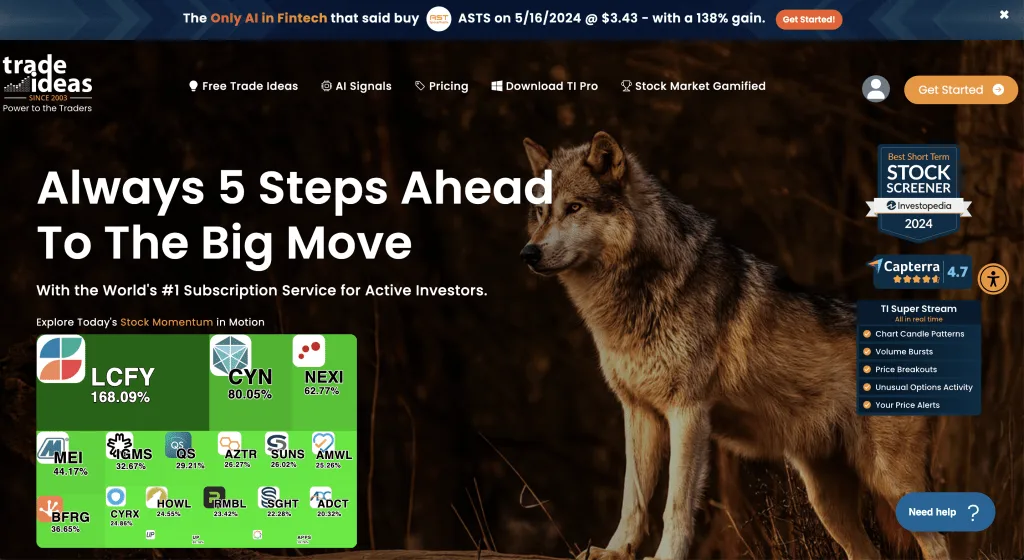
Real-Time Stock Scanning
Real-time stock scanning is the core feature. The platform continuously monitors the market and alerts traders when stocks match specific conditions. This is different from a static stock screener, which only filters stocks after you run a search.
It can be used to find stocks with unusual volume, strong price movement, premarket gaps, new highs, breakouts, low-float momentum, VWAP-related setups and other intraday conditions.
This is where the scanner is strongest. For active traders, speed matters. The system is designed to surface stocks in play while the move is happening, not after it is already over.
For practical scanner examples, see our guide to custom formula examples.
Holly AI
Holly AI is the platform’s AI-powered trading assistant and one of the main reasons active traders choose the Premium plan.
Holly analyzes market conditions, tests trading strategies and generates potential long and short trade ideas. Instead of simply showing stocks that match a filter, it attempts to identify setups with stronger historical probability based on strategy testing.
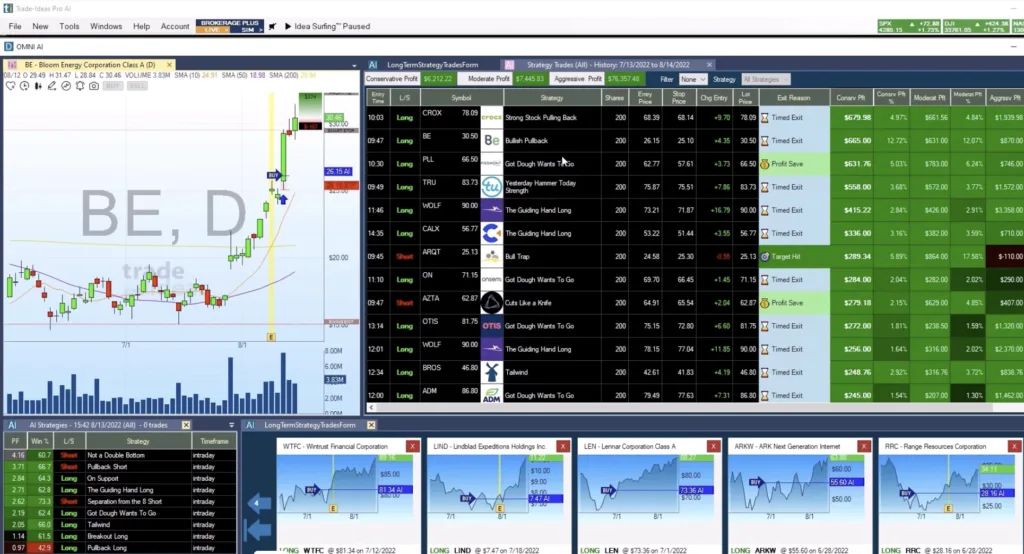
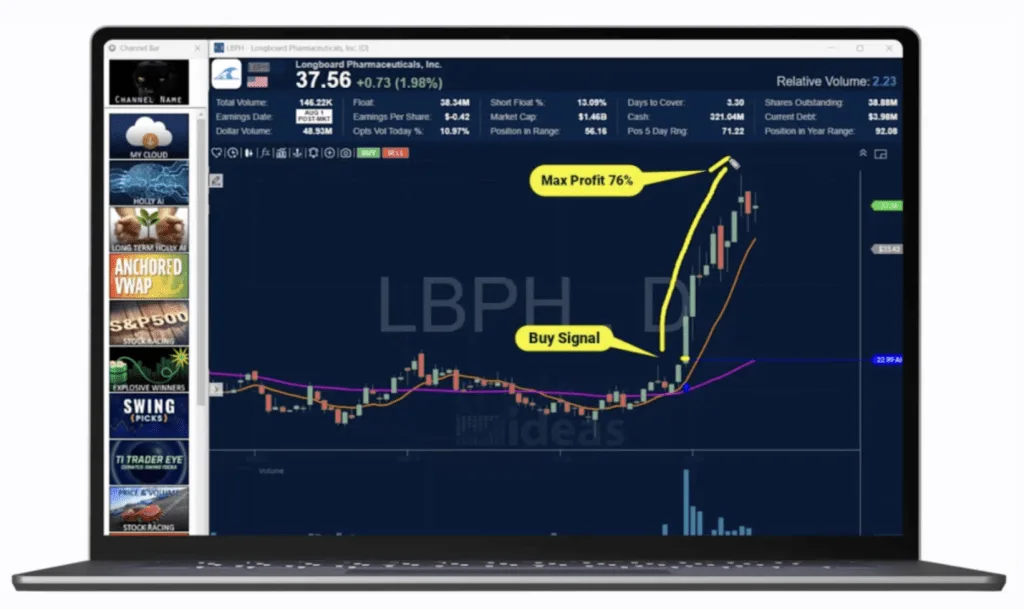
During the trading day, Holly’s signals appear directly inside the platform. Traders can review suggested entries, exits, risk levels and in-play trades. This can help users find opportunities they may otherwise miss.
Holly can be useful, but it should not be followed blindly. AI-generated signals can still lose money. Traders should always review the chart, volume, catalyst, market conditions and risk/reward before entering a trade.
Holly AI is best viewed as an idea-generation and strategy-support tool, not a guaranteed profit system.
For a deeper breakdown, read our full Holly AI review.
Brokerage Plus
Brokerage Plus is the built-in execution, simulation and automation module. It allows traders to move from scanning and alerting to order management inside the same workflow.
With Brokerage Plus, traders can place orders from charts and scanners, test strategies in the simulator and connect supported brokerage accounts. This is useful for users who want to paper trade, test scanner-based strategies or build a more systematic process.
The safest way to use Brokerage Plus is to start in simulation mode before connecting a live broker account. Automation can be powerful, but it can also amplify mistakes if your strategy is not properly tested.
For a deeper breakdown, read our full Brokerage Plus review.
Money Machine
Money Machine is one of the newer AI automation tools. It is designed to help traders identify and manage momentum-based opportunities using the scanner and automation ecosystem.
This feature is most relevant for traders who already understand the platform and want to explore more automated, AI-assisted workflows. It should not be treated as a guaranteed profit tool. Like all trading automation, it should be tested carefully in simulation before using real money.
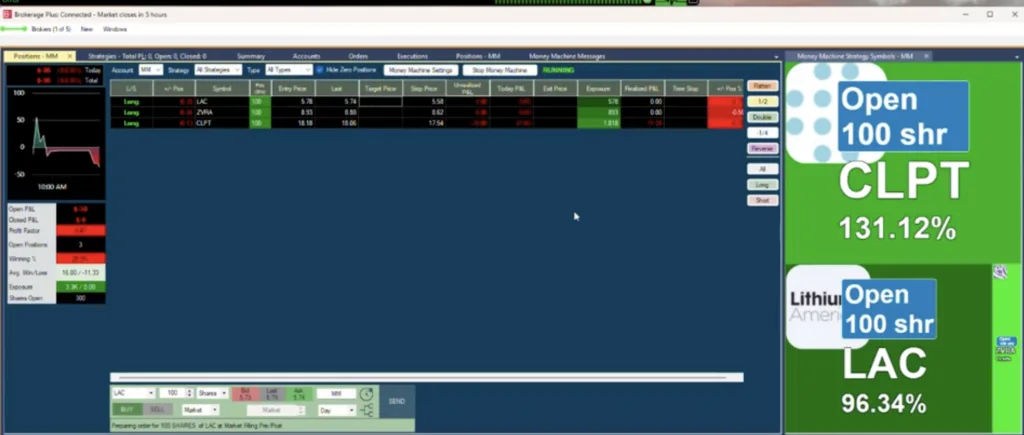
For a deeper look, read our Money Machine review.
Use coupon code TOPSTOCKS15 to save 15% on your first eligible payment.
Pre-Built Strategies
The platform includes a library of pre-built trading strategies, which makes it easier to use for traders who do not want to build every scan from scratch.
These strategies are designed around different market conditions and trading styles, including momentum trading, gap trading, breakout setups, pullbacks and swing trading. Instead of starting with a blank scanner, users can choose an existing strategy, review the logic and adapt it to their own trading style.
This is especially useful for newer users because the platform can feel overwhelming at first. The pre-built strategies give you a practical starting point and help you understand how experienced traders structure scans, alerts and filters.
Charts
The software includes built-in chart windows, which are useful for quickly verifying alerts without leaving the platform. When a stock appears in one of your scanners, you can immediately open a chart to check price action, trend, volume and key technical levels.
The charts are useful for scanner review, but they are not as advanced as a dedicated charting platform like TradingView. For many traders, the best workflow is to use this tool for scanning and alerts, while using TradingView or a broker platform for deeper chart analysis.
If charting is your top priority, read our TradingView review. If real-time scanner alerts are your priority, this platform is stronger.
Channel Bar
The Channel Bar is one of the most useful features for new users. It provides access to preconfigured channels built around different trading styles and market conditions, including momentum, gaps, short squeezes, premarket movers, after-hours activity and trend-following setups.
Each channel can include alert windows, top lists, multi-strategy windows and charts, giving traders a ready-made dashboard for a specific type of opportunity. This makes the platform easier to use at the beginning because you can start with existing scanner layouts instead of building everything manually.
Advanced traders can also customize these channels, adjust filters and use them as templates for their own strategies.
Top List Windows
Top List Windows display stocks matching specific criteria in a continuously updating list. Unlike alert windows, which show event-based signals as they happen, Top List Windows rank stocks by selected metrics.
This is useful for tracking stocks with the highest relative volume, biggest price changes, strongest momentum, unusual activity or other custom conditions. Traders can sort the list , adjust columns and use it as a live watchlist throughout the session.
Top Lists are especially useful when combined with concepts like relative volume and VWAP.
Formula Editor and Custom Scans
The formula editor allows traders to build more advanced scans and indicators beyond the standard filters. This is useful if you want to combine multiple conditions, create custom momentum signals, compare volume across time periods or build your own technical rules.
For advanced traders, this is one of the most powerful parts of the platform. It lets you move beyond pre-built scans and create highly specific setups based on your own trading style.
For examples, see our guide to custom formula examples.
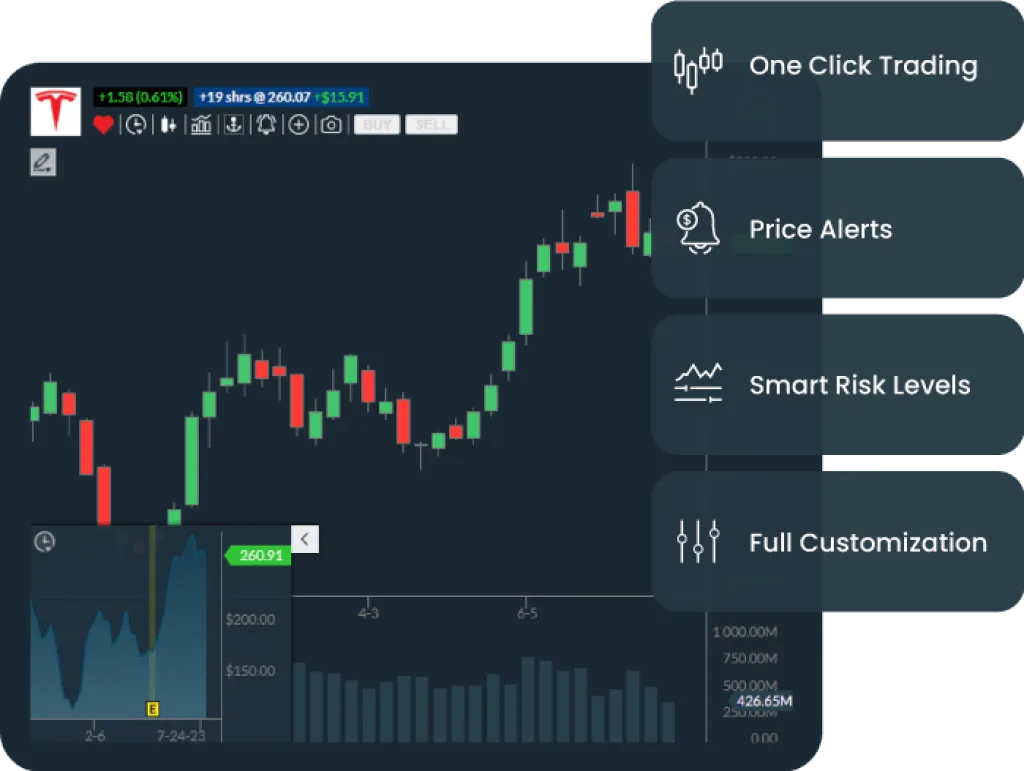
Smart Risk Levels
Premium includes Smart Risk Levels, which help traders assess potential risk and reward around a trade idea. Instead of only showing an alert or entry signal, the platform can provide context around where risk may be managed.
This is useful because many traders focus too much on entries and not enough on trade management. Smart Risk Levels can help traders think more clearly about position sizing, stop levels and exits.
Paper Trading and Simulator
Real-time paper trading allows users to test scans, strategies and trade ideas without risking real money. This is especially helpful for learning the platform, validating new setups and practicing execution before connecting a live brokerage account.
The simulator can be used alongside Brokerage Plus, giving traders a practical way to test alerts, entries, exits and strategy rules in live market conditions.
OddsMaker Backtesting
OddsMaker is the built-in backtesting tool available with the Premium plan. It allows traders to test scan ideas and trading strategies against historical market data before risking real money.
With OddsMaker, you can evaluate how a strategy may have performed in the past based on specific entry rules, exit rules, stop-loss settings, profit targets, time of day and other conditions.
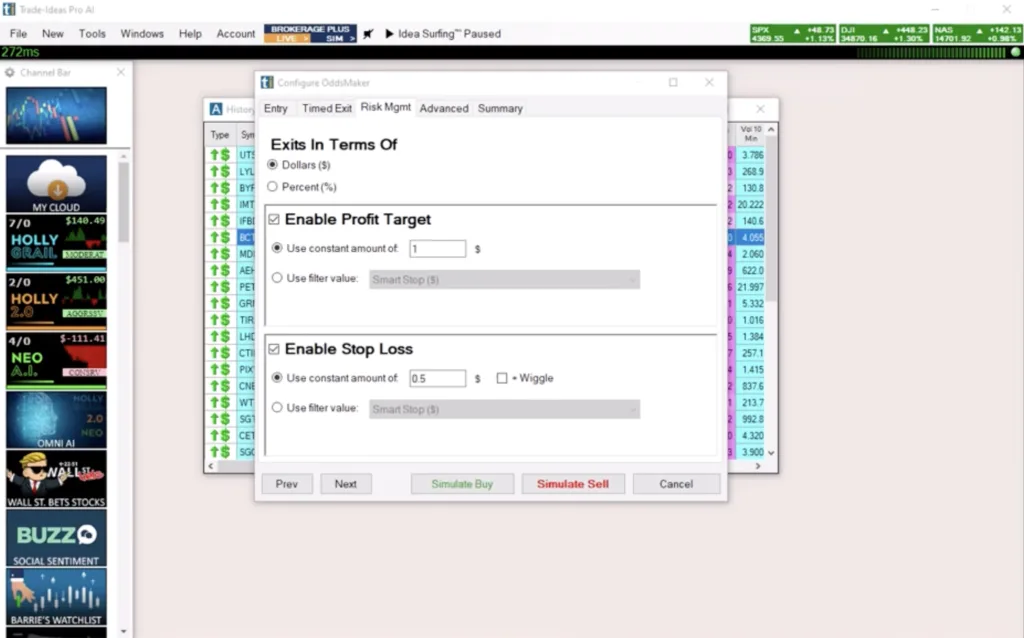
Backtesting does not guarantee future performance, but it helps remove guesswork. Instead of relying only on intuition, traders can use historical data to refine scans, improve rules and focus on setups with stronger statistical support.
Price Alerts and Sound Alerts
The platform supports price alerts and sound alerts, helping traders react quickly when a stock reaches a key level or meets a specific condition. This is useful during active sessions where watching every scanner manually is not realistic.
Custom alerts can help traders stay focused on the highest-priority setups while reducing the need to constantly monitor every chart.
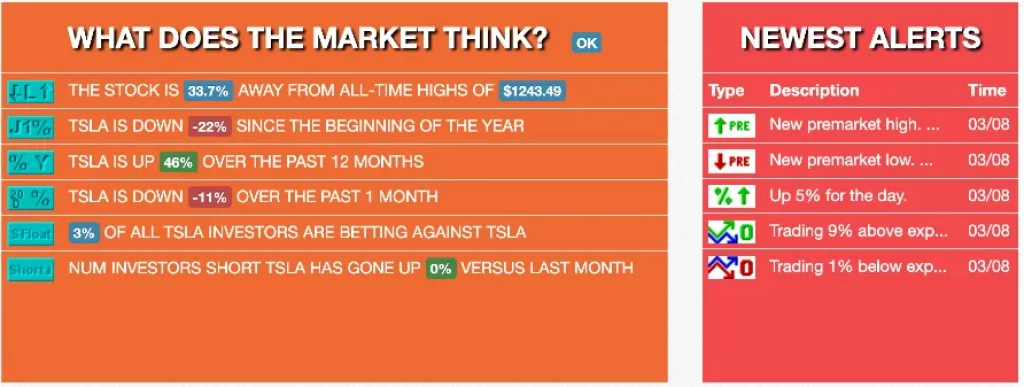
RBI and GBI Windows
Premium users also get access to RBI and GBI Windows, which are designed to help traders evaluate relative strength and broader market strength. These tools can be useful for identifying stocks that are outperforming or underperforming compared with the wider market.
For traders who rely on momentum, sector rotation or relative strengh, these windows add another layer of context beyond simple price and volume alerts.
One-Click Trading
Chart-based and one-click trading workflows allow traders to place and adjust orders directly from charts or platform windows instead of manually entering every order ticket in a separate broker platform.
This can be useful for active traders who want faster execution and better control over entries and exits. However, one-click trading should be tested carefully in simulation first. Fast order entry can also create fast mistakes if the wrong size, ticker or direction is used.
News
The built-in news feed streams market headlines directly inside the platform. This feature is useful for quick context, but the software is primarily a real-time stock scanner and technical trading platform, not a dedicated financial news terminal.
If a stock suddenly appears in your scanner, the news feed can help you quickly check whether there is a headline, catalyst, earnings report, analyst rating or other event behind the move.
For deeper news coverage, you may still want a dedicated news platform. Read our Benzinga Pro review if news alerts and squawk are more important to your trading workflow.
Education and Training
The company offers tutorials, webinars, support content and training sessions focused on learning the platform. These resources are useful because the software is powerful but can feel complex at first.
The education is mainly about using the scanner effectively rather than teaching trading from scratch. Users still need to understand trading basics, risk management and market behavior.
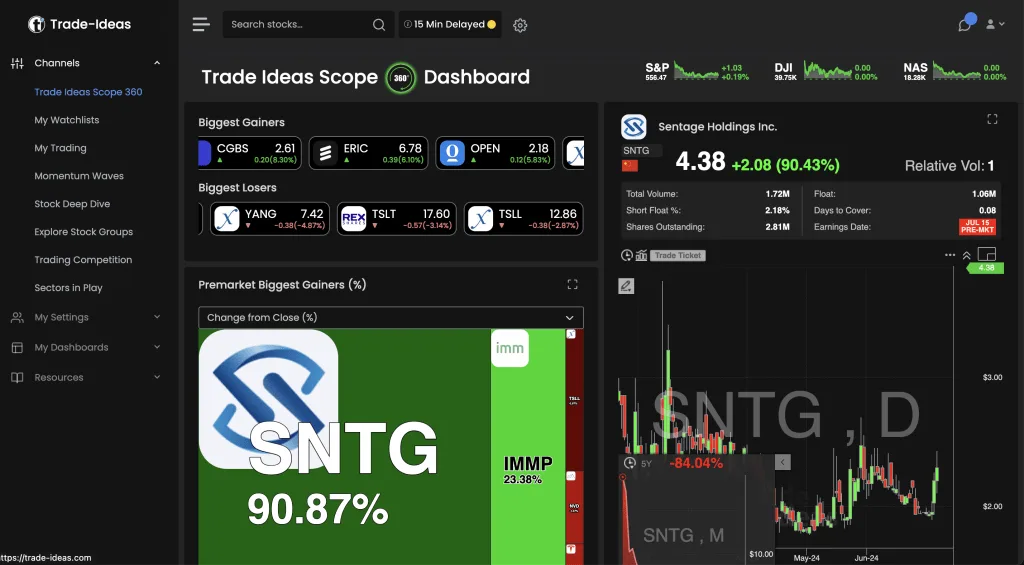
Web-Based Platform and Dashboards
The web-based dashboards and visualization tools make it easier to monitor the market from multiple angles. Traders can create tabs for different workflows, such as main watchlists, active trade ideas, sector heatmaps, momentum scans or broader market trends.
The platform also includes visual tools such as heatmaps, Picture-in-Picture charts and Stock Racing. These features help traders quickly identify market leaders and laggards, spot sector strength and see which stocks are moving in real time.
Trade Ideas Review: Pricing
The platform offers two main paid plans: a lower plan for core real-time scanning and a Premium plan for advanced features such as Holly AI, OddsMaker backtesting and Smart Risk Levels.
For this Trade Ideas review, pricing matters because many of the strongest features are locked behind the Premium plan. Traders should compare the cost against how often they will actually use the scanner during market hours.
Pricing can change, so always check the official checkout page before subscribing. At the time of writing, the annual plan pricing shows Basic at $89/month and Premium at $178/month when billed annually.
| Plan | Best For | Main Limitation | Annual Billing Price |
|---|---|---|---|
| Basic | Real-time scanning, alerts, charts, layouts and paper trading | No Holly AI or full Premium backtesting tools | $89/month, billed annually |
| Premium | Holly AI, OddsMaker backtesting, Smart Risk Levels and advanced strategy tools | More expensive | $178/month, billed annually |
If you are unsure which plan to choose, start by deciding whether you need Holly AI and backtesting. If yes, Premium is usually the better plan. If you only need fast real-time scans and alerts, the lower plan may be enough.
Before subscribing, check our Trade Ideas coupon codes page to see whether a discount is available.
Use coupon code TOPSTOCKS15 to save 15% on your first eligible payment. Always confirm the discount at checkout before completing your purchase.
Test Drive
The company does not always offer a normal full-featured free trial. Instead, it periodically runs a limited-time event called the Test Drive, which lets users try Premium-level functionality for a short period.
The Test Drive can be useful if you want to test Holly AI, backtesting, real-time scanner alerts and the general workflow before committing to a full subscription.
Read our full Test Drive review for more detail.
Coupon Code
You can use coupon code TOPSTOCKS15 to get 15% off your first eligible payment when the code is active.
Use coupon code TOPSTOCKS15 to save 15% on your first eligible payment.
Coupon availability, pricing and terms can change, so always check the final checkout page before purchasing. For more details, see our updated Trade Ideas coupon codes page.
Alternatives
This is one of the strongest stock scanners for active traders, but it is not the right tool for everyone. Some traders may prefer a cheaper screener, stronger charting, better news tools, options flow or fundamental research.
In this Trade Ideas review, the main alternatives we compare against are Scanz, Benzinga Pro, Black Box Stocks, Finviz and TradingView because they cover the closest use cases: real-time scanning, news alerts, charting and active trading workflows.
| Alternative | Best For | Comparison |
|---|---|---|
| Scanz | Real-time scanning, news and Level 2 data | Trade Ideas vs Scanz |
| Benzinga Pro | News alerts and squawk | Better for news, weaker for AI scanning |
| Black Box Stocks | Options flow and trading community | Better for options traders |
| Finviz | Free stock screening | Cheaper but much less advanced |
| TradingView | Charting and technical analysis | Better charts, weaker scanning |
For a full breakdown, read our guide to the best alternatives.
Is Trade Ideas Worth It?
It is worth it if you actively trade and need real-time stock scanning, fast alerts, AI-assisted trade ideas and strategy testing. It is especially useful for day traders, momentum traders and swing traders who rely on volume, gaps, breakouts and intraday price action.
The platform is not cheap, so the value depends on how often you use it. If it helps you find better setups, save time and avoid low-quality trades, the cost can be justified. If you only trade occasionally or only need simple research, it is probably more than you need.
For most serious active traders, the Premium plan is the more complete version because it includes Holly AI and backtesting. For users who only need core scanning and alerts, the lower plan may be enough.
If you are unsure, try the Test Drive when available or compare it with other platforms in our alternatives guide.
FAQ
What is the verdict of this Trade Ideas review?
Trade Ideas is worth it for active traders who need real-time stock scanning, AI trade ideas, custom alerts and backtesting. It is probably not worth it for casual investors or users who only need basic stock research.
Is Trade Ideas good for beginners?
Trade Ideas can be useful for serious beginners, but it has a learning curve. Complete beginners may prefer starting with simpler tools such as Finviz or TradingView before moving to a more advanced scanner.
What is Holly AI?
Holly AI is the platform’s AI trading assistant. It generates potential long and short trade ideas based on tested strategies and live market conditions.
Does Trade Ideas have backtesting?
Yes. The Premium plan includes OddsMaker, the platform’s backtesting tool. It helps traders test scan ideas and strategies using historical market data.
Is Trade Ideas better than Finviz?
Trade Ideas is better for real-time scanning, AI trade ideas and active day trading. Finviz is better for free basic screening and quick market research.
Can I get a Trade Ideas discount?
Discount codes or promotional offers may be available. Check our Trade Ideas coupon codes page before subscribing and always confirm the discount at checkout.
Final Verdict
The main takeaway from this Trade Ideas review is straightforward: this is a genuinely powerful platform, but it rewards traders who already have a clear process. The more actively you scan the market, the more value you will extract from it.
Trade Ideas remains one of the best stock scanners available for active traders in 2026. Its standout strengths are best-in-class real-time scanning, Holly AI trade signals, OddsMaker backtesting, advanced custom alerts, formula-based scans, paper trading and broker-connected automation — a combination that is hard to match in a single platform.
It is not the cheapest option and it is not the easiest platform for complete beginners. But for traders who actively scan the market, trade momentum, watch premarket movers or want AI-assisted trade ideas, it remains one of the strongest tools available.
If you only need basic research, use a free screener like Finviz or a charting tool like TradingView. If you need a serious real-time scanner for active trading, this platform is worth considering.
Use coupon code TOPSTOCKS15 to save 15% on your first eligible payment.
Related articles: Trade Ideas Coupon Codes, Custom Formula Examples, Holly AI Review, Money Machine Review, Brokerage Plus Review, Test Drive Review, Alternatives.
See also: Trade Ideas Alternatives.