Trade Ideas Custom Formula Examples

We are reader-supported. When you buy through links on our site, we may earn a commission (see affiliate policy).
Trade Ideas Custom Formulas: Best Examples for Stock Scans
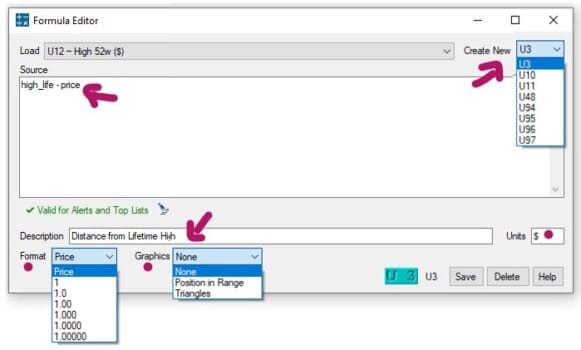
One of the most powerful features in Trade Ideas is the ability to create your own custom formulas. Built-in scans and alerts are useful, but custom formulas let you go further by creating your own logic, combining signals and building filters around the way you actually trade.
Whether you are looking for momentum stocks, high relative volume, breakout setups, strong closes, gap-and-go moves, pullback entries or early morning volume spikes, custom formulas can help you reduce noise and find better trading opportunities faster.
This guide covers practical Trade Ideas custom formula examples, what each formula does, suggested MIN/MAX values and how to combine formulas into real scan ideas.
Important: Always test formulas inside your own Trade Ideas layout before using them live. Field names, available filters and formula behavior can vary depending on your setup, data package and scan configuration.
If you are still deciding whether the platform is right for you, read our full Trade Ideas review, our guide on whether Trade Ideas is worth it, or our comparison of Trade Ideas vs Scanz.

Trade-Ideas.com
Quick List of Trade Ideas Custom Formula Examples
| Use Case | Formula | What It Finds |
|---|---|---|
| Volume surge | v_up_1 / v_up_5 * 5 | Sudden short-term volume spikes |
| High relative volume | v / avgvol | Stocks trading above normal volume |
| Intraday momentum | (close - open) / open * 100 | Stocks up strongly from the open |
| Time filter | seconds_after_open / 60 / 60 | Scans limited by time of day |
| Strong close | (close - low) / (high - low) | Stocks trading near the high of day |
| Gap percentage | (open - closey) / closey * 100 | Gap-up and gap-down stocks |
| Trend confirmation | ema20 > sma50 | Bullish moving average alignment |
| Price above moving averages | close > sma20 and close > sma50 and close > sma200 | Stocks in broader uptrends |
| Volatility squeeze | (high - low) / close < 0.01 | Stocks trading in a tight range |
| 5-day relative strength | (close - close5) / close5 * 100 | Recent outperformers |
Related Trade Ideas Guides
Custom formulas are only one part of the platform. These related guides can help you understand the wider Trade Ideas workflow:
- Trade Ideas Holly AI Review — how the AI trade assistant works.
- Trade Ideas Brokerage Plus Review — using scans and alerts for trade execution.
- Trade Ideas Money Machine Review — newer AI-driven automation tools.
- Trade Ideas Test Drive Review — temporary access to Premium features.
- Trade Ideas Coupon Codes — current discount information.
Best Trade Ideas Custom Formula Examples
1. Volume Surge Detection
Formula:
v_up_1 / v_up_5 * 5This formula compares the volume in the last 1 minute to the average volume over the past 5 minutes. It helps detect sudden bursts of activity, which can appear before or during a breakout.
A useful starting point is:
MIN = 2.0This shows stocks where the current short-term volume pace is at least double the recent average. It is useful for breakout scans, opening range strategies, momentum alerts and news-driven moves.
For more background on volume-based scanning, read our guide to relative volume and RVOL.
2. High Relative Volume
Formula:
v / avgvolThis compares current volume to the stock’s average volume. A result of 2 means the stock is trading at 2x average volume. A result of 5 means it is trading at 5x average volume.
Example filter:
MIN = 2High relative volume is one of the most useful filters for active traders. Stocks moving on low volume are often unreliable. Stocks moving with unusually high volume usually have more attention, better liquidity and a better chance of producing tradable setups.
Use this formula for momentum stocks, gap-up runners, breakout candidates, stocks in play and unusual activity scans.
3. Intraday Price Momentum
Formula:
(close - open) / open * 100This calculates the percentage change from today’s open to the current price. It helps identify stocks with strong same-day momentum.
Example filter:
MIN = 3This finds stocks that are up more than 3% from the open. It can help separate stocks that are still moving from stocks that only gapped up and faded.
This formula is useful for day trading scans, momentum continuation setups, breakout confirmation and finding strong intraday movers.
4. Time Since Market Open
Formula:
seconds_after_open / 60 / 60This converts the number of seconds since market open into hours. It allows you to filter scans by time of day.
First hour of trading:
MIN = 0
MAX = 1
Power hour:
MIN = 6
MAX = 7
Different strategies work better at different times of day. The open is usually more volatile, midday is often slower and the final hour can produce continuation moves or reversals. This formula helps you create scans that only trigger during the trading window you care about.
5. Strong Close Near High of Day
Formula:
(close - low) / (high - low)This measures where the current price is compared with the stock’s daily range. A result near 1 means the stock is trading near the high of the day. A result near 0 means it is trading near the low of the day.
Example filter:
MIN = 0.8This finds stocks trading in the top 20% of their daily range. For a stricter scan, try:
MIN = 0.85Stocks trading near the high of the day often show strong buying pressure. This formula is useful for strong close scans, end-of-day momentum, swing trade watchlists and breakout continuation setups.
6. Percentage Gap From Previous Close
Formula:
(open - closey) / closey * 100This calculates the percentage gap between today’s open and yesterday’s close. A positive result means the stock gapped up. A negative result means it gapped down.
Gap up more than 4%:
MIN = 4Gap down more than 3%:
MAX = -3Gap scans are popular because large overnight moves often create trading opportunities. A gap-up stock may continue higher if the catalyst is strong. A gap-down stock may create a short setup, reversal setup or bounce opportunity.
7. EMA vs SMA Trend Confirmation
Formula:
ema20 > sma50This checks whether the 20-period exponential moving average is above the 50-period simple moving average. When the shorter-term moving average is above the longer-term moving average, it can suggest bullish short-term trend strength.
This works as a true or false condition. It is useful for trend-following scans, momentum strategies, swing trade filters and breakout confirmation.
8. Price Above Key Moving Averages
Formula:
close > sma20 and close > sma50 and close > sma200This checks whether the stock is trading above the 20-day, 50-day and 200-day simple moving averages. A stock trading above all three major moving averages is usually in a stronger technical position than one trading below them.
Use this formula for swing trading scans, trend continuation setups, momentum watchlists and filtering out weak charts.
You can combine it with high relative volume:
v / avgvolThis helps find stocks that are not only in an uptrend, but also attracting unusual trading activity.
9. Volatility Squeeze Setup
Formula:
(high - low) / close < 0.01This finds stocks with a very tight daily range. A result under 0.01 means the stock’s high-low range is less than 1% of its current price.
Low volatility often comes before higher volatility. When a stock trades in a tight range, it may be coiling before a breakout or breakdown.
This formula works best when combined with other filters such as high relative volume, price near resistance, price above moving averages, a recent news catalyst or a tight premarket range. A tight range alone is not enough because many stocks stay flat for a reason.
10. Relative Strength Over the Last 5 Days
Formula:
(close - close5) / close5 * 100This calculates the percentage gain over the last 5 trading days. It helps identify recent outperformers.
Example filter:
MIN = 5This finds stocks that have gained at least 5% over the past 5 days. Stocks that have been strong recently may continue attracting buyers, especially if volume is increasing and the broader market is supportive.
11. Price Near 52-Week High
Formula:
(close / highy) > 0.95This shows how close the current price is to the yearly high. A result above 0.95 means the stock is trading within 5% of its 52-week high.
Stocks near yearly highs often show strong relative strength. Many traders prefer buying strength rather than weakness. This formula is useful for breakout scans, relative strength watchlists, swing trading setups and trend-following strategies.
12. Bullish Moving Average Crossover
Formula:
close > sma20 and closey < sma20yThis detects when a stock closes above the 20-day simple moving average after previously being below it. In simple terms, it looks for a bullish cross back above the 20-day SMA.
This can be useful for finding stocks that are starting to regain momentum after a pullback. It may work well for mean-reversion setups, pullback bounce scans, early trend reversal alerts and swing trade entries.
For better confirmation, combine it with relative volume:
v / avgvolA stock crossing above the 20-day SMA on 2x average volume is usually more meaningful than a low-volume crossover.
Best Trade Ideas Custom Scan Combinations
Some of the best scans come from combining formulas rather than relying on one signal. Volume, price strength, trend and time of day all matter. The formulas below can be used together to create more focused scans.
Gap and Go Momentum Scan
This scan looks for stocks that gap up, trade with strong relative volume and continue moving higher after the open.
Gap percentage:
(open - closey) / closey * 100Relative volume:
v / avgvolIntraday momentum:
(close - open) / open * 100Example setup:
- Gap up more than 4%
- Relative volume above 2x
- Intraday price strength above 2%
This helps find stocks that did not only gap up, but are also continuing higher with volume. That distinction matters because many gap-up stocks fade after the open.
Strong Trend and High Volume Filter
This scan looks for stocks that are already in an uptrend, trading with unusual volume and holding near the high of the day.
Price above major moving averages:
close > sma20 and close > sma50 and close > sma200High relative volume:
v / avgvolStrong close:
(close - low) / (high - low)Example setup:
- Relative volume above 2x
- Strong close value above 0.8
- Price above the 20-day, 50-day and 200-day moving averages
This is a stronger setup than looking at one signal alone because it combines trend, activity and intraday strength.
Breakout Watchlist Formula Ideas
For a breakout-focused scan, consider combining these conditions:
close > sma20v / avgvol > 2(close - low) / (high - low) > 0.8(close / highy) > 0.95This combination helps find stocks that are strong, active and trading near important highs. Breakout scans usually work best when you avoid low-volume names. A breakout without volume is much less reliable.
Reversal Watchlist Formula Ideas
For reversal scans, you may want different logic. Instead of looking for stocks near highs, you might look for stocks that were weak but are starting to recover.
Bullish move from open:
(close - open) / open * 100Reclaiming the 20-day moving average:
close > sma20 and closey < sma20yStrong close from low:
(close - low) / (high - low)Example setup:
- Intraday gain above 2%
- Strong close value above 0.75
- Price reclaiming the 20-day moving average
This can help find stocks that opened weak, reversed and are now closing strong.
Best Practices for Trade Ideas Custom Formulas
Custom formulas are powerful, but they should be used carefully. A formula can look good in theory and still perform badly in live trading. The goal is not to create the most complicated formula. The goal is to create something that helps you find better setups.
Keep Formulas Simple
Simple formulas are easier to understand, test and improve. A formula like v / avgvol is basic, but very useful. A complicated custom formula with too many conditions may become overfitted and unreliable.
Combine Signals Carefully
One formula rarely tells the full story. High volume is useful, but high volume plus strong price action is better. For example, relative volume becomes more meaningful when combined with intraday price strength or a strong close near the high of day.
Avoid Overfitting
Do not build formulas that are too specific just because they worked once. A filter that only works on one ticker, one market condition or one random backtest period is probably not robust.
A good formula should make sense logically before you test it.
Use Minimum and Maximum Values
The formula itself is only part of the scan. The MIN and MAX values matter just as much. For example, v / avgvol with MIN = 2 is very different from MIN = 10. A higher threshold gives fewer but more extreme results. A lower threshold gives more results but more noise.
Test Different Market Conditions
A scan that works in a strong bull market may perform badly in a choppy or bearish market. Test your formulas across strong market days, weak market days, high-volatility periods, low-volatility periods, earnings season and news-heavy sessions.
This gives you a better idea of when your formula actually works.
How Custom Formulas Fit Into a Trade Ideas Workflow
Custom formulas are most useful when they are part of a full trading process. The formula helps find candidates, but it should not be the entire decision-making system.
A practical workflow could look like this:
- Use a custom formula to find stocks with unusual volume or momentum.
- Check the chart to confirm structure, trend and key levels.
- Look for a catalyst such as news, earnings, sector strength or unusual activity.
- Define your entry, stop, target and risk before taking the trade.
- Track your results in a trading journal so you can review whether the formula is actually helping.
If you do not already track your trades, see our guide on how to journal your trades. A formula that feels useful may not actually improve your results unless you review the data over time.
Always Backtest Before Trading Live
No matter how good a custom formula looks, do not use it with real money before testing it. Trade Ideas has backtesting tools that can help you validate scans using historical data.
Backtesting helps you check:
- How often the formula triggers
- Whether signals are too early or too late
- Whether the setup works across different stocks
- Whether the scan produces too much noise
- Whether the idea has real edge or only looks good visually
Custom formulas should support your trading process, not replace risk management. For automation and trade execution, read our Trade Ideas Brokerage Plus review.

Frequently Asked Questions
What are Trade Ideas custom formulas?
Trade Ideas custom formulas are user-created formulas that let traders build their own scan logic. They can be used to measure volume, momentum, gaps, moving averages, price strength and other trading conditions.
What is a good Trade Ideas formula for relative volume?
A simple relative volume formula is v / avgvol. A value of 2 means the stock is trading at roughly twice its average volume. Many traders use a minimum value of 2 as a starting point.
Can custom formulas be used for day trading scans?
Yes. Custom formulas are especially useful for day trading scans because they can help identify intraday momentum, volume spikes, gap moves, strong closes and time-specific setups.
Should I backtest Trade Ideas custom formulas?
Yes. You should always test and backtest custom formulas before using them with real money. A formula can look logical but still produce poor results in live market conditions.
Are Trade Ideas custom formulas good for beginners?
Beginners can use simple formulas, but the feature is more useful once you understand what you are trying to scan for. New users may want to start with built-in scans before creating more advanced formulas.
Final Thoughts
Trade Ideas custom formulas are one of the best ways to turn the platform into a scanner that matches your own trading style.
Instead of using only generic alerts, you can create formulas for volume spikes, gap moves, momentum strength, trend confirmation, strong closes, volatility squeezes and breakout setups.
Start with simple formulas like v / avgvol, (close - open) / open * 100 and (close - low) / (high - low). Then combine them with sensible filters, test them carefully and refine them over time.
Used properly, custom formulas can help you find cleaner setups, avoid weaker trades and react faster when real opportunities appear. Start small, test thoroughly and keep iterating.
Related Articles
- Trade Ideas Review
- Is Trade Ideas Worth It?
- Trade Ideas Holly AI Review
- Trade Ideas Brokerage Plus Review
- Trade Ideas Money Machine Review
- Trade Ideas Test Drive Review
- Trade Ideas vs Scanz
- Relative Volume Explained
- VWAP Explained
- How to Journal Your Trades
Learn more: Trade Ideas Review.